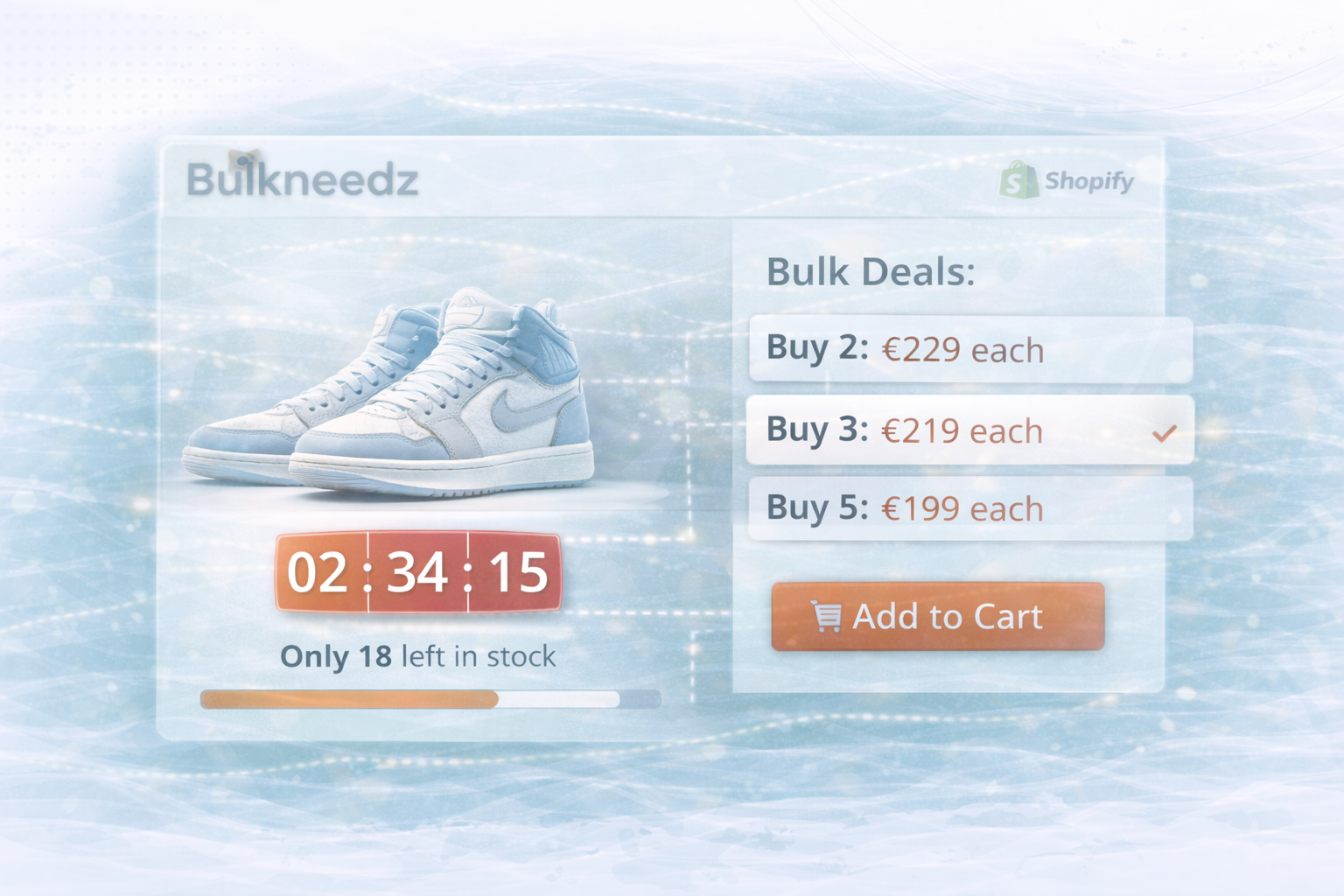
Bulkneedz is a specialized e-commerce platform for “bulk deals” related to limited sneaker releases. Developed by UNHYDE, the platform specifically creates urgency via time-limited deals and a real-time stock interface. By combining Shopify's robust e-commerce features with tailored front-end features such as countdown timers and dynamic inventory display, shopping becomes an interactive, time-critical experience.
The solution combines Shopify's standard functionality with custom JavaScript for dynamic front-end updates. Shopify provides the authoritative inventory source, while the frontend shows remaining units and time until the deal is closed in real time. This creates a seamless connection between robust backend and responsive UI.

Objective: Live countdown that automatically ends or resets when it expires. The end time is obtained from a product metafield.
technologies: Liquid (for metafield output), JavaScript (for client-side computation and rendering).
Liquid example (excerpt):
Liquid:
<!-- product.liquid or a section template -->

{%- comment -%}
  We first check if the product has a metafield called `countdown_end`
  in the `custom` namespace. If it exists, we assign that to `deal_end_time`.
  Otherwise, we use a fallback date.
{%- endcomment -%}

{% if product.metafields.custom.countdown_end %}
  {% assign deal_end_time = product.metafields.custom.countdown_end %}
{% else %}
  {% assign deal_end_time = '2025-03-01 23:59:59' %}
{% endif %}

<div id="countdown-timer"
     data-deal-end-time="{{ deal_end_time | date: '%Y/%m/%d %H:%M:%S' }}">
</div>

<script>
  (function() {
    const countdownElement = document.getElementById('countdown-timer');
    const dealEndTimeStr = countdownElement.dataset.dealEndTime;
    const dealEndTime = new Date(dealEndTimeStr).getTime();

    function updateCountdown() {
      const now = new Date().getTime();
      const distance = dealEndTime - now;

      if (distance <= 0) {
        countdownElement.innerHTML = "Deal Closed";
        // Optionally disable purchase button or handle deal closure logic
        return;
      }

      // Calculate remaining days, hours, minutes, seconds
      const days = Math.floor(distance / (1000 * 60 * 60 * 24));
      const hours = Math.floor((distance % (1000 * 60 * 60 * 24))
                               / (1000 * 60 * 60));
      const minutes = Math.floor((distance % (1000 * 60 * 60))
                                 / (1000 * 60));
      const seconds = Math.floor((distance % (1000 * 60))
                                 / 1000);

      // Render in the HTML element
      countdownElement.innerHTML =
        `${days}d ${hours}h ${minutes}m ${seconds}s`;
    }

    // Update the countdown every second
    setInterval(updateCountdown, 1000);
    updateCountdown(); // Run once on page load
  })();
</script>
product.metafields.custom.countdown_end provides the end time per product.countdown_start), a start time can be managed.
Objective: Show remaining inventory in real time and dynamically carry the progress indicator.
technologies: Liquid (initial value stocks), JavaScript (UI update via event or API feedback).
Liquid example (excerpt):
Liquid:
<!-- product.liquid or a section template -->
{% assign total_stock = product.variants.first.inventory_quantity %}

<div class="stock-container">
  <p>Stock remaining: <span id="stock-remaining">{{ total_stock }}</span></p>
  <div class="stock-bar" style="border: 1px solid #000; width: 100%; height: 20px;">
    <div id="stock-progress" style="background: #FF4500; height: 100%; width: 0%;">
    </div>
  </div>
</div>

<script>
  (function() {
    const totalStock = parseInt("{{ total_stock }}", 10);
    const stockRemainingElement = document.getElementById('stock-remaining');
    const stockProgressElement = document.getElementById('stock-progress');

    // Function to update the progress bar
    function updateStockProgress(currentStock) {
      // Calculate the percentage of stock used (or remaining)
      const percentage = ((totalStock - currentStock) / totalStock) * 100;
      stockProgressElement.style.width = percentage + '%';
    }

    // On page load, set initial progress
    let currentStock = totalStock;
    updateStockProgress(currentStock);

    // Example: If an item is purchased, decrease the current stock by 1
    // This could be triggered by a real event or an API callback
    document.addEventListener('purchaseMade', function() {
      currentStock -= 1;
      if (currentStock < 0) currentStock = 0;

      // Update UI
      stockRemainingElement.innerText = currentStock;
      updateStockProgress(currentStock);
    });
  })();
</script>
PurchaseMade), which can be triggered after checkout or AJAX purchase.
The combination of strategic UX design, targeted custom features and a stable Shopify base makes Bulkneedz a platform with high conversion power. Countdown and live stock are the central triggers of the customer journey and make it crystal clear how short time and inventory are. Maintaining deal times via product metafield enables individual schedules per product without hardcoding and significantly simplifies content and campaign management. With Shopify's inventory system plus streamlined JavaScript logic, brands that want to implement similar urgency mechanics achieve a scalable and effective solution that accelerates buying decisions and noticeably intensifies the shopping experience.
UNHYDE is a web and Shopify agency from Munich with a focus on web development, UX/UI and performance. Our goal is high-performance, scalable platforms that deliver measurable growth and strong brand experiences. As a recognized Shopify partner, UNHYDE has successfully launched numerous websites and web shops worldwide. contact: hello@unhyde.me — we are happy to develop a solution for live stock, countdowns and bulk deals tailored to your goals.

Get in touch
contact now